


How to Launch a Token on Flap Launchpad in 30 seconds
Launch your token on Flap in minutes with CoinFactory — no code, no smart contracts. Create and deploy on BSC or Robinhood with instant DEX Screener visibility.
 CoinFactory
Why Launch Your Token on Flap?
Launching a token is only the first step — getting it noticed is what really matters. Flap Launchpad helps new projects reach an active community from day one across BSC and Robinhood, giving creators a better opportunity to attract early holders, generate trading activity, and build momentum.
With CoinFactory, you can create and launch your token on Flap in just a few minutes. No coding, no complicated smart contracts, and no technical setup. Simply fill in your token details, connect your wallet, and your project will be ready to launch on one of the fastest-growing launchpads across the BSC and Robinhood ecosystems.
Benefits of Launching on Flap
- 🚀 Launch in Minutes — Create and launch your token without writing a single line of code.
- 👥 Active Community — Put your project in front of Flap users actively looking for new token launches.
- 📈 Better Visibility — Give your token a stronger chance of being discovered from day one, with instant DEX Screener indexing.
- 🔒 Secure Smart Contracts — Launch using professionally developed and audited token contracts.
- ⚡ Simple Process — Everything from token creation to launch is completed in just a few clicks.
- 🌐 Multi-Chain — Launch on BSC or Robinhood — whichever ecosystem best fits your audience.
- 💼 Perfect for Any Project — Launch meme coins, community tokens, utility tokens, gaming tokens, or DeFi projects with the same simple workflow.
Whether you're launching your first meme coin or building a long-term crypto project, Flap Launchpad gives your token a better starting point by combining fast deployment with exposure to an active trading community.
Step-by-Step Instructions
The whole flow is designed to take minutes. Here's exactly what to do.
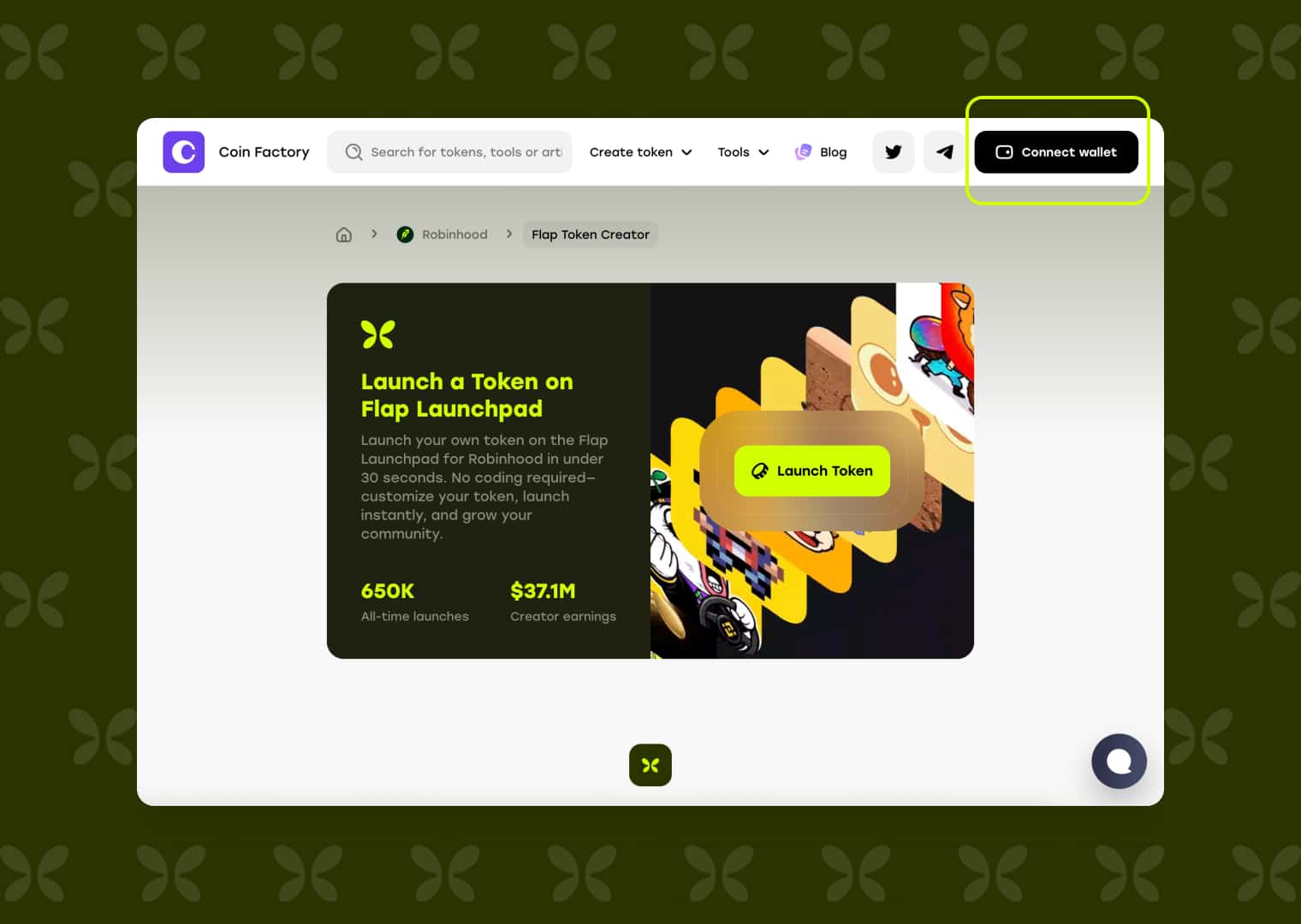
Step 1: Open the Flap Token Launcher
You'll land on the Launch a Token on Flap Launchpad page, where you can create your own token in under 30 seconds — no coding required. With 650K+ all-time launches and $37.1M+ in creator earnings, it's a proven place to start. Click Launch Token to begin.
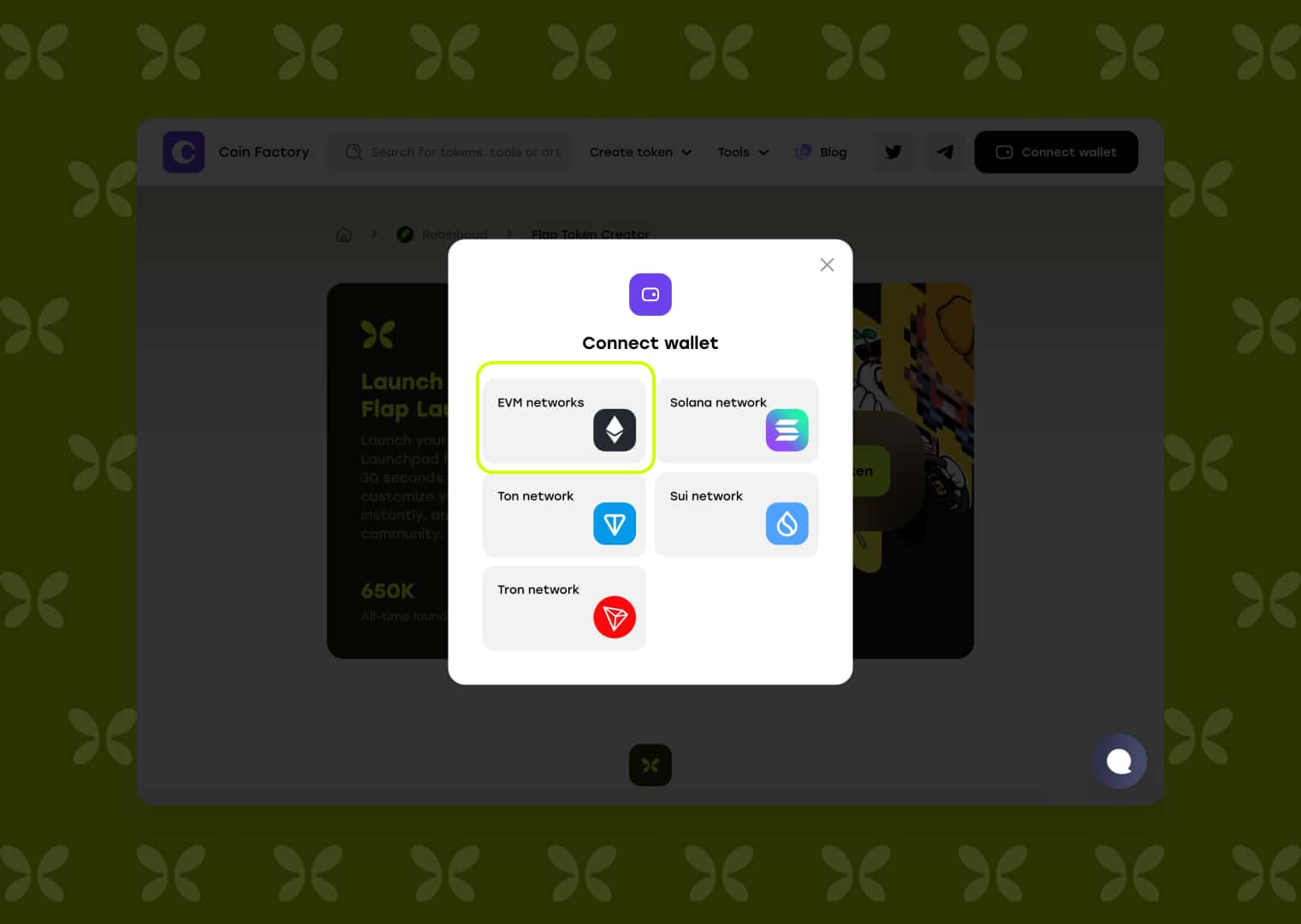
Step 2: Connect Your Wallet
Click Connect wallet in the top-right corner. In the popup, choose your network type — for BSC and Robinhood, select EVM networks (Solana, Ton, Sui, and Tron are also supported for other chains). Approve the connection in your wallet to continue.
Step 3: Fill in your token details
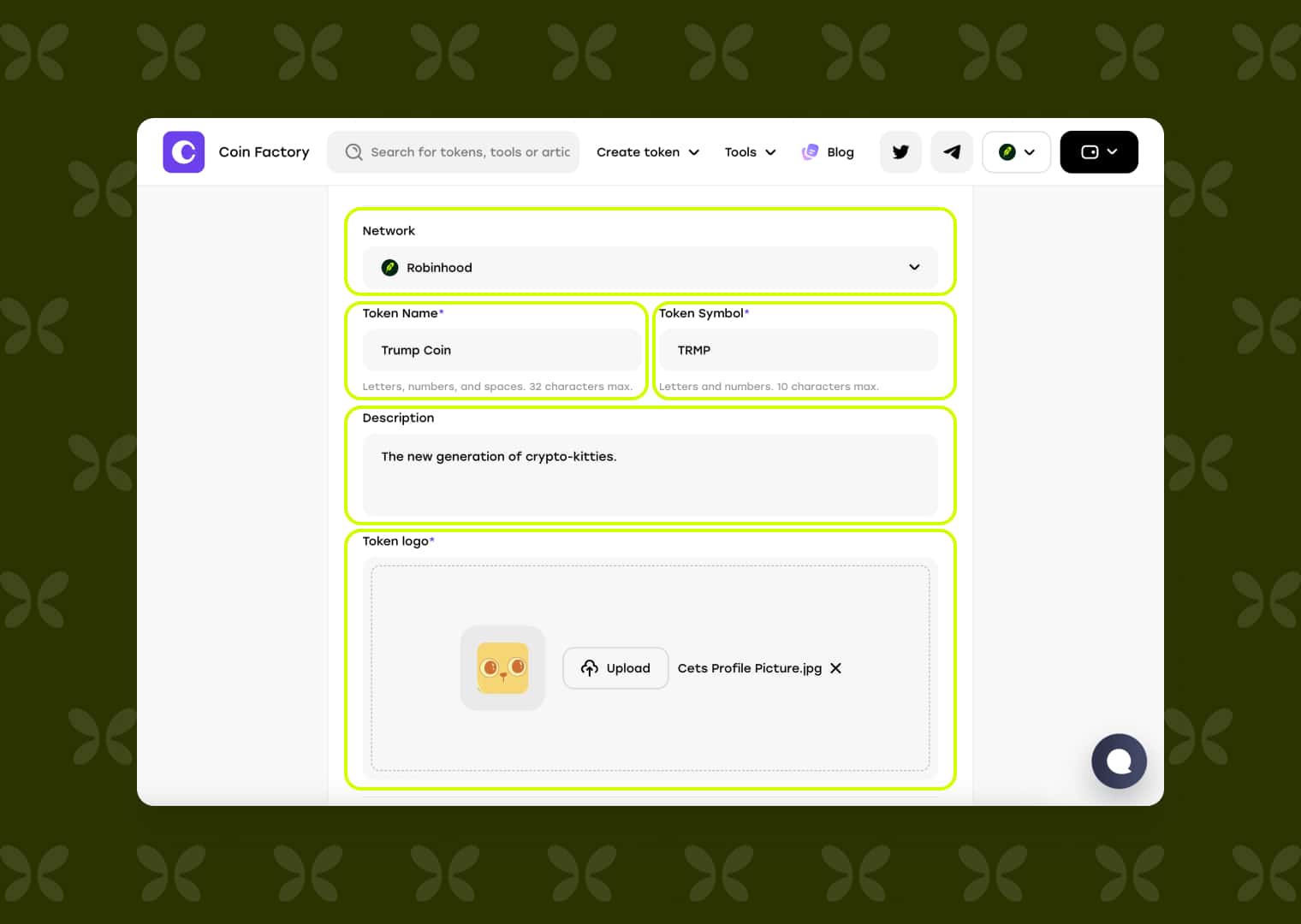
This is where your token takes shape. Complete the main fields first:
- Network — choose Robinhood or BSC.
- Token Name — letters, numbers, and spaces, up to 32 characters (e.g. "Trump Coin").
- Token Symbol — letters and numbers, up to 10 characters (e.g. "TRMP").
- Description — a short, punchy summary of what your token is about.
- Token Logo — upload a JPG, PNG, or GIF up to 5 MB. A square 512×512 px image looks cleanest across explorers and trading tools.
Then scroll down to finish your setup:
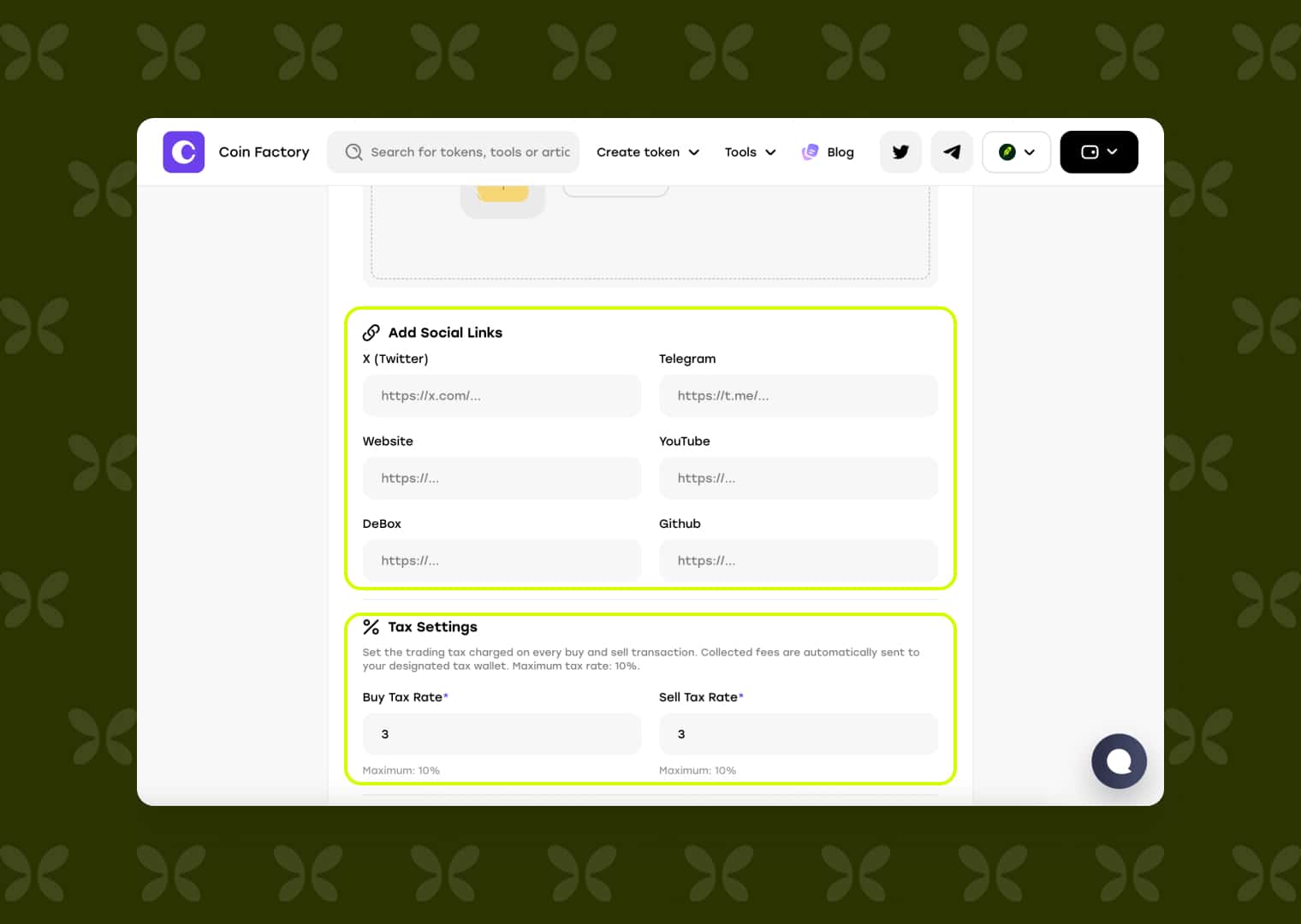
- Add Social Links — X (Twitter), Telegram, Website, YouTube, DeBox, and GitHub. These are the trust and discovery links traders click before they buy.
- Tax Settings — set a Buy Tax Rate and Sell Tax Rate (up to 10% each). Collected fees are routed automatically to your designated tax wallet.
Step 4: Set your creator buy and launch
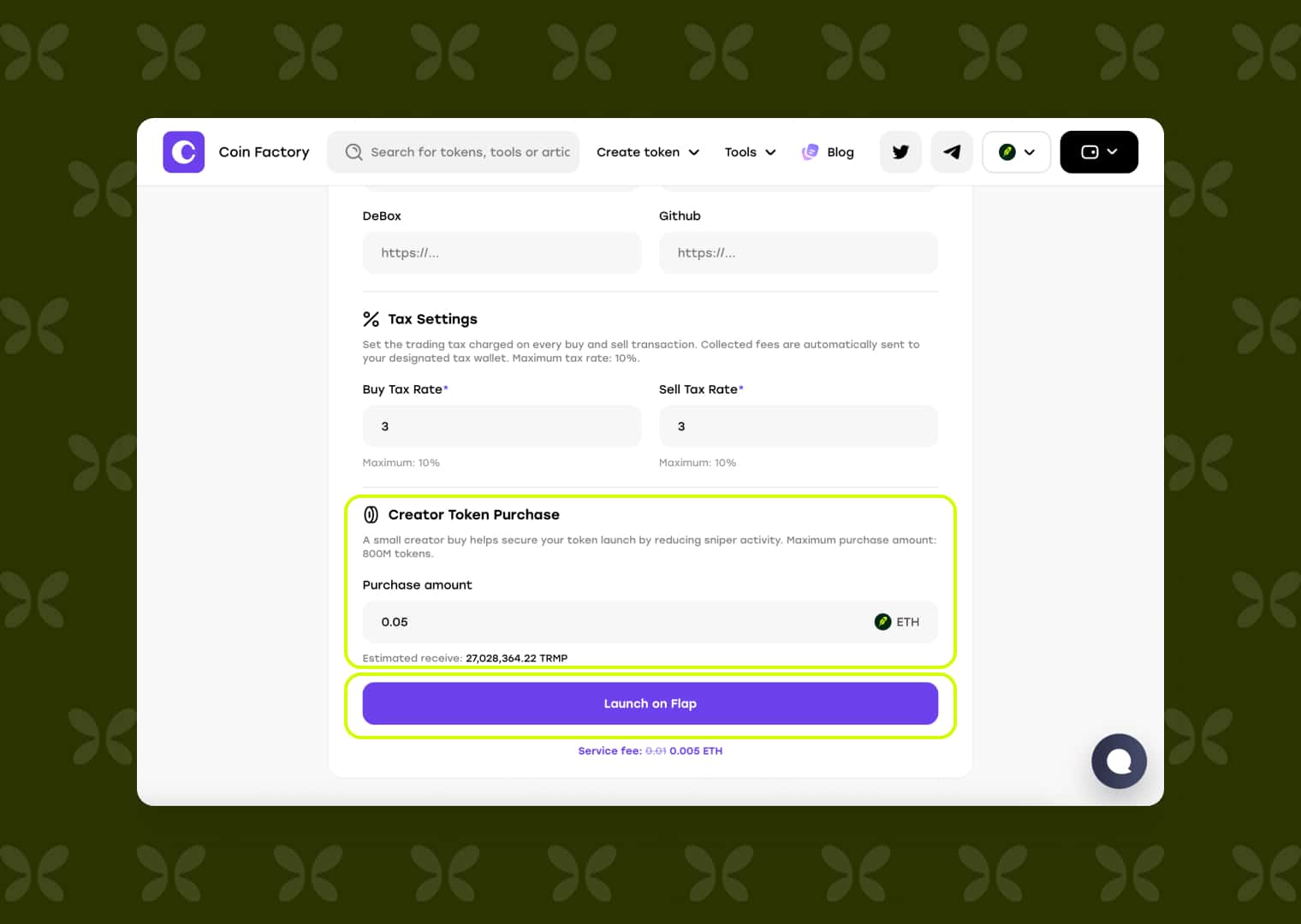
Optionally, use Creator Token Purchase to make a small buy at launch (up to 800M tokens) — this helps secure your launch by reducing sniper activity. Enter an amount (e.g. 0.05 ETH) and you'll see the estimated tokens you'll receive.
Review everything, check the service fee shown above the button (0.005 ETH at the time of writing), then click Launch on Flap and approve the transaction in your wallet. No code review, no manual contract verification.
💣 Your Token is Live
Once the transaction confirms, you land on the launch success screen — confirmation that your token is now live on the Flap launchpad.
From here you get a full Token Information summary at a glance:
- Date created and Network (e.g. BSC)
- Platform (Flap)
- Token Address, Token Name, and Token Symbol
- Total Supply (e.g. 1,000,000,000)
- Your Description
You'll also see a Transaction link to view the on-chain deployment and a Claim rewards option. Most importantly, the Links to your token section gives you one-click access to your token's Flap page and its DEX Screener listing — so you can start tracking price, volume, liquidity, and holders in real time, and share it straight with your community.
This is the moment the marketing engine starts. Your token is discoverable, indexed, and shareable — ready to hand to traders.
Conclusion
Creating a token no longer requires a developer, an audit budget, or a week of setup. With the CoinFactory launcher on the Flap launchpad, you go from an idea to a live, tradable token on BSC or Robinhood in four steps — and you launch straight into a community and market tooling that give your project real visibility from the first minute.
If you've been sitting on a token idea, the technical barrier is gone. Open the launcher, connect your wallet, fill in your details, and launch on Flap today.
Tags

Flap launchpad
Robinhood chain
Bsc chain
Launch token
Meme
Token creator